
WordPress permalink structure is perhaps the most debated issue be it in WordPress specific forums or on other blogs. Earlier at DailyBlogging I had kept the permalink structure to /%year%/%month%/%date%/%postname%. But after a week or two I changed that to /%category%/%postname%/.
The reasons were pretty logical for this change. First: I seldom used to post daily because there was hardly any use of posting tons of post everyday when there is no one to read them. So having a date specific permalink was nothing short of a blogging suicide.
Second: I liked the inclusion of the category slug as it provides another keyword in addition to the post slug. I used to the Dean’s permalink migration plugin to setup a 301 redirect from the old permalink structure to the new one.
Now I’m on the verge of launching another blog, this time though specifically to cover Android related news and updates. So while setting up the blog I was again put into a fix by this permalink structure thing.
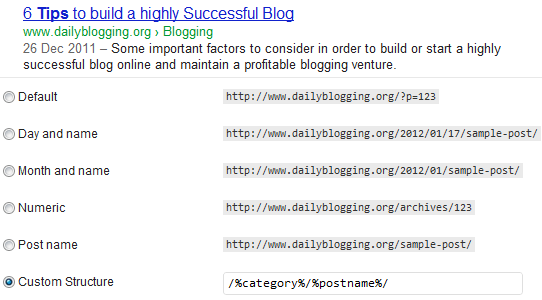
The best WordPress permalink structure ?
To overcome this though scenario it was necessary to read what the experts are saying about an optimal WordPress permalink structure.
After going through some 4-5 posts from reputed SEO experts and bloggers I was left with 3 logical options.
- Combination of post-id and post name.
- Only post name.
- Category name with the post slug.
I know you would argue on the exclusion of the popular permalink structure [/%year%/%month%/%date%/%postname%/]. The counter argument is really simple i.e. that particular permalink structure would just make you posts URLs that bit longer.
Also if you don’t post in bulk (daily) then this strurture if of hardly any use. Moreover it makes your old posts look literally OLD.
So which permalink structure would you choose ? SEO and performance wise all the three are equally optimal (as you’ll find them in the below sections). Lets go into the details and see if we could come up with a definite pick.
Performance issues with permalinks
There is a lot of talk about not using the /%category%/%postname%/ permalink structure just because it causes some performance issues. I must say that, all such talks are ridiculous. It would’ve made sense if you were using a WordPress version below 3.3.
The problem with the inclusion of category in post URLs was that our database used to query between the category slugs and the main pages (as both as text fields). For example if your post URL was yourblogname.com/privacy/some-post-name/ then the database would initiate a query to find out if the slug privacy is a category name or a page.
In WordPress 3.3 this issue no longer remains a definitive problem as they’ve added some special parameters to differentiate between page slugs and category names.
Otto, one of the core contributors in the WordPress development team confirms it on his blog when he says:
In August 2011, thanks to highly valuable input from Andy Skelton which gave me a critical insight needed to make it work, and with Jon Cave and Mark Jaquith doing testing (read: breaking my patches over and over again), I was able to create a patch which fixed the problem (note: my final patch was slightly over-complicated, Jon Cave later patched it again to simplify some of the handling). This patch is now in WordPress 3.3.
Even if you feel there is a mild performance issue with certain permalink structures then install the W3 Total cache plugin and enable the Page cache feature.
The SEO factor
Now you would ask, why is the /%post_id%/%postname%/ permalink structure still used (so widely) on news breaking blogs & sites ? The simple answer is that, earlier Google’s algorithm demanded blog post URLs to have 3 numerics in it so as to feature them in Google News.
But now Google has provided an alternative in the form of News sitemaps to feature blogs & sites in their news section. The reason why popular blogs are not wiling to change the permalink structure now is because, some of them fear a temporary drop in search engine traffic.
So there is no SEO related issue with any of these permalink structures. If I was you I wouldn’t have chosen the /%post_id%/%postname%/ structure. What is the use of lengthening our post URLs when we know that a post-id provides nothing exceptional ?
A counter view on using the combination of category name & post name could be that, your posts are actually put inside a virtual directory (i.e. under the specific parent category) and then served. But again that is a popular myth as most search engines give equal priority to all the URLs present in your blog.
Matt Cutts view on WordPress permalink structures
Recommended articles on this topic
- Joost’s opinion on WordPress permalinks – Very nicely compiled article. He talks about the SEO benefits of various permalink structures and recommends the plain post name structure.
- AppThemes’ view – Another post which addresses mainly the performance issue.
So if I were to suggest a permalink structure then it would surely be one among-st, a plain post name [/%postname%/] or category slug with the post name [/%category%/%postname%/]. Notice the trailing slash.
Which permalink structure do you prefer on your blog(s) ?