.
Home » Software » Auto-Reconnect your disconnected Internet connection using ReConnect

Auto-Reconnect your disconnected Internet connection using ReConnect

by on July 29, 2010 · 37 comments

Many a time Internet users face this irritating problem of disconnected net while downloading specially applicable to Broadband users like me who keep their downloads on and off the monitor & go away.

But we fail to get an update whether our connection is intact or its disconnected due to some server/LAN Problems. Though, the default Dial-up software in windows provides an option to reconnect but I feel that doesn’t do the job properly sometimes.

So we need a dedicated software to make the work simpler. ReConnect does that job pretty well.
Internet cable

[Image Credit]

The amazing part of this software is that, it is only 200 kb approximately and its portable, so no nonsense installation needed. But it provides almost all the features you need from such a small weighed app.
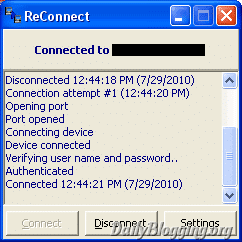
ReConnect

Features

  • Gives the user the ability to choose which connect he/she wants to Auto-Reconnect
  • Startup settings to enable it to start with windows & Auto-Connect
  • Scheduler along with options to choose between Disconnecting the connection & shutting down the pc.
  • Session Logs to log important events taking place in a .txt file
  • Auto-Reconnect settings (Duration & Retry attempts)
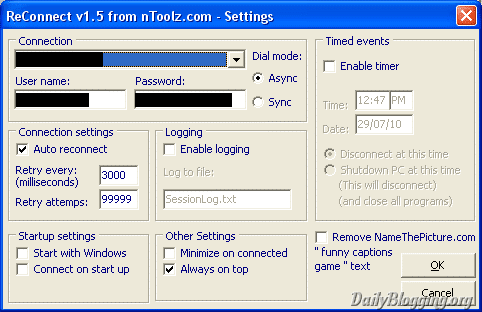
ReConnect Settings

Do try this handy app and share your views in the comments section!

Share & Save
Subscribe to DailyBlogging

Article by Mani Viswanathan

I'm a Web Designer/Developer, SEO'er and a Blogger who gives a few Blogging Tips in the form of posts/tutorials. Follow & Subscribe to my Blog if you feel it's worth it.

Mani has written 208 article(s) for DailyBlogging

Find Me On :-

Facebook : @mani0993

Twitter : @mani0993

{ 27 comments… read them below or add one }

1 Bloggers Planet July 30, 2010 at 3:30 am

Very useful. I’ll try this.

Reply

2 Mani Viswanathan
Twitter:
July 30, 2010 at 11:41 am

Thanks for the comment..Do try and share whether you liked it or not!

Reply

3 Tech Maish
Twitter:
July 30, 2010 at 11:21 am

This application is very useful for Dial UP connection users. However it will also increase the charges. As in our country every time we connect internet through dail up connection, they charge $.009.

Reply

4 Mani Viswanathan
Twitter:
July 30, 2010 at 11:41 am

:O thats pretty much for just connecting the internet lolz..its better in here..we don’t have to pay for connecting..also here unlimited plans are more common than limited one’s.

Reply

5 Robin July 30, 2010 at 1:02 pm

Great tool i most face this problem with my BSNL Data One. Going to try this out. Thanks

- Robin

Reply

6 Mani Viswanathan
Twitter:
July 30, 2010 at 7:57 pm

Thanks for the comment Robin. Do try it and share ur views with us!

Reply

7 shashank
Twitter:
July 31, 2010 at 6:25 am

nyce utility..
BSNL gets disconnected many times in between,
this app is definitely go-g0 for the BSNL dataone users :)

Reply

8 Mani Viswanathan
Twitter:
August 2, 2010 at 6:06 am

Yup, I have heard many BSNL problems so staying away from it..But this app will surely help solve your problem as it quickly connects the internet unlike the Default windows dial-up!

Reply

9 Vinay
Twitter:
July 31, 2010 at 4:04 pm

Wow!! Nice article buddy :) Liked it :) Thanks for sharing :)

Reply

10 Mani Viswanathan
Twitter:
July 31, 2010 at 5:29 pm

Glad I could help you..thanks for the encouraging comments :-)

Reply

11 pharmacy technician August 1, 2010 at 8:42 pm

Great site. A lot of useful information here. I’m sending it to some friends!

Reply

12 CNA License August 2, 2010 at 7:25 am

What a great resource!

Reply

13 Mani Viswanathan
Twitter:
August 2, 2010 at 7:46 pm

Thanks for ur comment. Much Appreciated!

Reply

14 nursing schools August 2, 2010 at 11:58 pm

found your site on del.icio.us today and really liked it.. i bookmarked it and will be back to check it out some more later

Reply

15 Technoblogsite
Twitter:
August 4, 2010 at 4:25 am

nice tool…… will sure check out…….

Reply

16 Mani Viswanathan
Twitter:
August 4, 2010 at 5:35 pm

Yup, its a really useful app..check it & share your experience with it!

Reply

17 Seospidy August 6, 2010 at 3:13 pm

Excellent post i wish to use this Application.

Reply

18 Pharmacy technician jobs in California August 6, 2010 at 10:32 pm

Wow this is a great resource.. I’m enjoying it.. good article

Reply

19 youtube auto commenter September 7, 2010 at 6:04 pm

This is a really great post; it’s given me a few things to ponder over. I will definitely keep an eye on this blog in the future. Nice work, keep it up!

Reply

20 Pulkit Kaushik September 7, 2010 at 6:36 pm

Nice! Thanks! My MTNL kills me!

Reply

21 Techfudge October 7, 2010 at 10:23 pm

Well nice trick there..
Will try and report back to tell if it worked

Reply

22 vivek Netan November 1, 2010 at 5:43 pm

I have tried this software many days back. I am sorry to say it is not advisable to use this software. We used this software in our LAN Server and it results in many software Glitch and the result was Malfunctioning of our ISA Server.

Due to this we have to reconfigure ISA Server.

Reply

23 Azad Shaikh January 27, 2011 at 2:53 am

Hey Is there any alternative to this software as my nortan antivirus says its a trojan.
Thanks

Reply

24 Maher
Twitter:
May 21, 2011 at 7:17 pm

Its Amazing Software For Me…

Reply

25 Amol January 15, 2012 at 3:37 am

it is not detecting any network in my PC. i m using windows xp. please advise…….

Reply

26 atul January 16, 2012 at 8:59 pm

my anti virus remove the software what can i do ?

Reply

27 Hardik January 21, 2012 at 2:51 am

Sorry to sat but this is not working for me..

I download and install softwere correctly.
but when my net dc this softwere showing connecting atempt 1 but it can connect..

I have some doubt in setting..
i use reliance cdma stick.
so i have to enter user name and password for it..
but in setting whenever i type password and save..
when i again open password doest show to me..
i think that problem cause me plzz tell me how to fix it..

Thankx in advance..
:)

Reply

Leave a Comment

Use your real name in the 'Name' field. Comments found with only Keyword-filled Names will be trashed.

{ 10 trackbacks }

Previous post:

Next post: